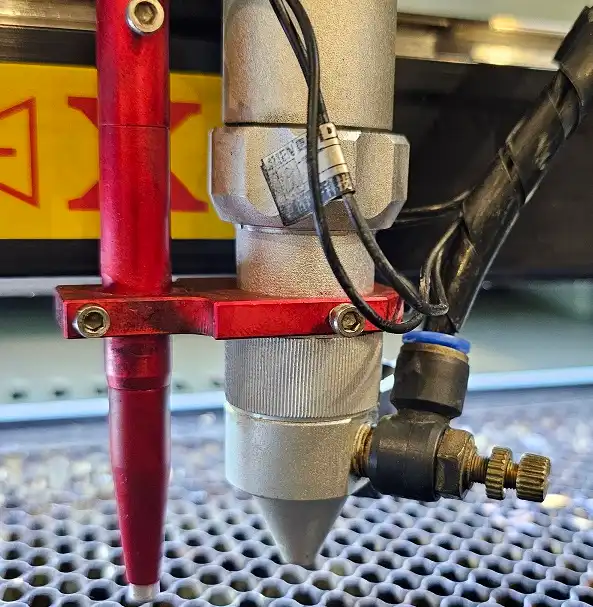
Pro Tip: These laser system maintenance tips work great with other brands too!
Your Thinklaser Lightblade system is a precision-engineered tool designed to deliver outstanding performance for all your laser cutting and engraving needs. To ensure it continues operating at peak efficiency and provides reliable results, regular maintenance is essential. Here are some practical laser system maintenance tips to keep your Lightblade in top condition.
1. Keep the Optics Clean
The mirrors and lenses in your Lightblade system are critical areas for your laser system maintenance tips regimen for laser performance. Dust, debris, or residue can impair the laser beam’s focus and reduce cutting or engraving quality. Follow these steps to maintain clean optics:

- Inspect the lenses and mirrors regularly for dirt or smudges.
- Use a lens cleaning solution and a lint-free cloth to gently clean the surfaces.
- Avoid touching the lenses or mirrors with your fingers to prevent oil transfer.
2. Check and Align the Mirrors
Proper laser mirror alignment ensures that the laser beam travels correctly through the system. Misaligned mirrors can lead to inconsistent cutting results. To maintain alignment:
- Periodically test the beam alignment using alignment paper.
- Adjust the mirrors as needed to ensure the laser beam is parallel to both the X & Y axis at each point in its path.
- Use the Lightblade user manual for detailed alignment instructions.
3. Clean the Work Area
Debris and residue from previous cuts can accumulate on the cutting bed and surrounding areas, affecting performance and potentially causing damage. To keep the work area clean:
- Remove waste material from the cutting bed after each use.
- Vacuum or wipe down the work area to prevent debris build up.
- Check the air-assist nozzle for blockages and clean it as needed.
4. Inspect the Cooling System
The cooling system prevents your laser tube from overheating, ensuring long-term durability. Regularly check the following:

- Ensure the coolant (usually distilled water) is clean and topped up.
- Inspect the water chiller or cooling unit for proper operation.
- Check hoses for leaks, kinks and wear.
- Replace the coolant periodically to prevent algae or residue buildup.
5. Maintain the Laser Tube
The laser tube is the heart of your Lightblade system. Proper care can extend its lifespan:

- Avoid running the laser tube at maximum power for extended periods. NB: your laser was set up at the factory to ensure you cannot accidently overdrive your laser tube. If you have replaced your laser tube yourself, you may need to reviewing the max power levels are correct.
- Monitor the laser’s output power and replace the tube when performance begins to decline. We recommend the Mahoney Laser Power Meters supplied by our partner site LaserUser.com
- Keep the tube and its connections clean and free from dust.
6. Lubricate Moving Parts
The motion system of your Lightblade—including the rails, belts, and bearings—requires regular lubrication to prevent wear and ensure smooth operation:
- Use a recommended lubricant to clean and grease the rails and moving parts. We would suggest a Dry Molybdenum Disulphide spray as this does not trap dust or particulates.
- Inspect the belts for signs of wear or damage and replace them if necessary.
- Keep the motion system free from debris to avoid blockages or misalignment.
7. Test and Calibrate Regularly
To maintain precision and accuracy, periodic calibration is crucial:
- Test the laser’s focus regularly and adjust the focal height if needed.
- Check the laser bed is level at all 4 corners.
- Use the Lightblade’s calibration tools to ensure the system is properly tuned.
- Check for any inconsistencies in engraving or cutting depth and adjust settings as necessary.
8. Update Software and Firmware
Stay up-to-date with the latest software and firmware for your Lightblade system:
- Download updates from the Thinklaser website to access new features and improvements.
- Regularly check for compatibility updates with your design software.
- Backup your settings before performing updates to avoid data loss.
9. Perform Routine Safety Checks
Safety should always be a priority when using a laser system:
- Inspect safety interlocks and ensure they are functioning correctly.
- Confirm the emergency stop button is operational.
- Verify the laser housing and exhaust system are in good condition.
10. Schedule Professional Maintenance
While regular DIY maintenance is essential, periodic professional servicing can help identify and resolve deeper issues. Contact Thinklaser’s support team to schedule professional maintenance and ensure your Lightblade system operates at its best.
By following these maintenance tips, you can prolong the lifespan of your Thinklaser Lightblade system, ensure consistent performance, and avoid costly repairs. A well-maintained laser system not only improves your workflow but also delivers the high-quality results your projects deserve.
For laser machine troubleshooting, check out our Technical Support & Laser Troubleshooting Guide for even more tips to keep your laser system in tip-top condition.
For more information, visit the Thinklaser website or contact our support team today!
